
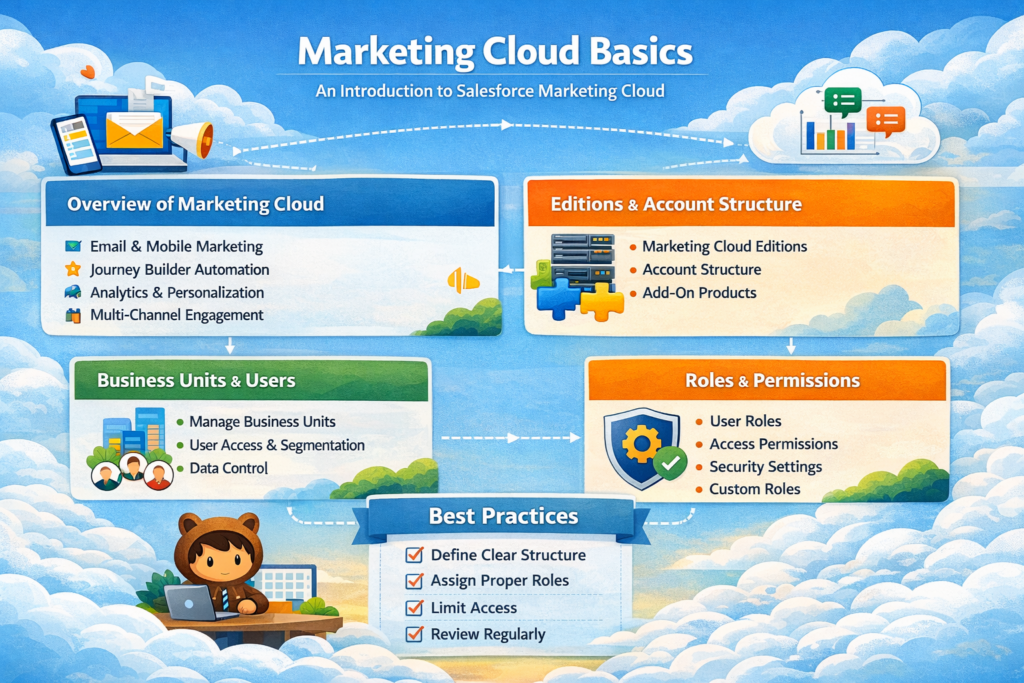
Salesforce Marketing Cloud is a powerful digital marketing platform designed to help businesses create personalized, data-driven customer journeys across multiple channels. From email and mobile messaging to social media and advertising, Marketing Cloud enables marketers to engage the right audience with the right message at the right time.
This article provides a foundational understanding of Marketing Cloud, covering its overview, editions, account structure, business units, users, roles, and permissions.
1. Overview of Marketing Cloud
Salesforce Marketing Cloud is a cloud-based digital marketing automation and analytics platform. It allows organizations to manage customer data, design personalized campaigns, automate marketing workflows, and analyze performance across channels.
Key Objectives of Marketing Cloud
-
Deliver personalized customer experiences
-
Automate marketing communications
-
Centralize customer data
-
Improve customer engagement and retention
-
Measure and optimize marketing performance
Core Marketing Channels
Marketing Cloud supports multi-channel engagement, including:
-
Email Marketing
-
Mobile Marketing (SMS, Push Notifications, WhatsApp)
-
Social Media Marketing
-
Digital Advertising
-
Web and App Personalization
Key Components
Some of the commonly used studios and tools include:
-
Email Studio – Email campaign creation and management
-
Journey Builder – Customer journey automation
-
Contact Builder – Data modeling and customer profiles
-
Automation Studio – Backend automation and data processing
-
Mobile Studio – SMS and push notifications
-
Advertising Studio – Ad audience management
-
Personalization & Data Cloud (optional add-ons)
2. Marketing Cloud Editions & Account Structure
Marketing Cloud Editions
Salesforce offers different Marketing Cloud editions based on business size and requirements. While exact features may vary by contract, the editions generally include:
-
Marketing Cloud Engagement (Basic / Pro / Corporate / Enterprise)
-
Email and mobile marketing
-
Journey Builder
-
Automation and analytics
-
Scales from small teams to large enterprises
-
-
Marketing Cloud Account Engagement (Pardot)
-
Focused on B2B marketing automation
-
Lead nurturing and scoring
-
Sales and marketing alignment
-
-
Add-On Products
-
Data Cloud
-
Personalization
-
Intelligence (Datorama)
-
WhatsApp and advanced mobile features
-
Account Structure
A Marketing Cloud account is the top-level container that holds:
-
Business Units
-
Users
-
Data Extensions
-
Subscribers
-
Content and campaigns
Each organization typically has one main account, which can be divided into multiple Business Units for better control and segmentation.
3. Business Units & Users
What Are Business Units?
Business Units (BUs) are logical divisions within a Marketing Cloud account. They help large organizations manage multiple brands, regions, or departments under a single account.
Why Use Business Units?
-
Separate data for different brands or regions
-
Control user access
-
Maintain data security and governance
-
Customize content and preferences per unit
Common Business Unit Structures
-
By Region: APAC, EMEA, Americas
-
By Brand: Brand A, Brand B, Brand C
-
By Function: Marketing, Support, Loyalty
Users in Marketing Cloud
Users are individuals who log in and perform actions within Marketing Cloud.
Each user:
-
Is assigned to one or more Business Units
-
Has specific roles and permissions
-
Can access only the features and data allowed by their role
Users can be:
-
Marketers
-
Developers
-
Administrators
-
Analysts
-
Content creators
4. Roles & Permissions
What Are Roles?
Roles define what actions a user can perform in Marketing Cloud. Roles are made up of permissions that control access to features, data, and functionality.
Standard Roles in Marketing Cloud
Some commonly used default roles include:
-
Administrator
-
Full access to all features
-
Manages users, roles, and account settings
-
-
Marketing Cloud Channel Manager
-
Manages campaigns and journeys
-
Access to Email Studio, Journey Builder, and Mobile Studio
-
-
Content Creator
-
Creates emails and content
-
Limited access to data and automation
-
-
Data Manager
-
Manages data extensions and imports
-
Works with Contact Builder and Automation Studio
-
-
Analyst
-
View-only access to reports and dashboards
-
Permissions
Permissions control:
-
Read, write, delete access
-
Ability to send emails or activate journeys
-
Access to data extensions
-
Automation and scripting capabilities
Permissions are categorized by:
-
Studio access (Email Studio, Automation Studio, etc.)
-
Data access
-
Administrative controls
Custom Roles
Organizations can create custom roles by combining specific permissions. This ensures:
-
Better security
-
Least-privilege access
-
Role alignment with job responsibilities
5. Best Practices for Beginners
-
Start with clear Business Unit architecture
-
Assign minimum required permissions
-
Use role-based access control
-
Keep administrators limited
-
Document user roles and responsibilities
-
Regularly review and clean up inactive users
Conclusion
Understanding Marketing Cloud basics is essential for building scalable and secure marketing operations. From knowing how the platform works to managing Business Units, users, roles, and permissions, these foundational concepts ensure smooth campaign execution and effective governance.
Salesforce Marketing Cloud empowers organizations to deliver meaningful customer experiences—but success begins with a strong understanding of its core structure and access management.
